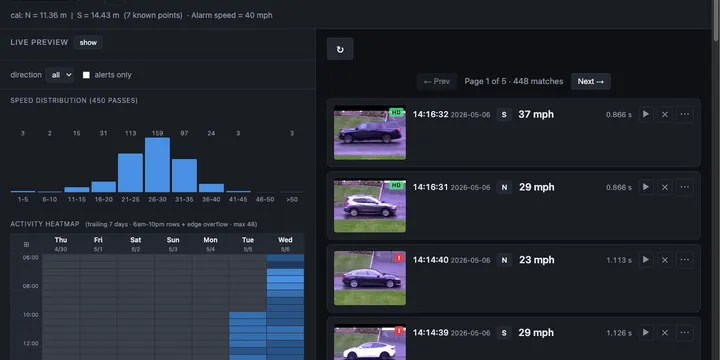
Building CamWatch with Claude Code: a five-year idea, shipped in two days without writing a line of code
Live: camwatch.leidevs.com (Cloudflare Access)
Why this had been on the shelf for five years
Some drivers go faster than I’d like on our residential street. The town’s portable speed-display trailer didn’t help much. A few drivers, and a couple of kids on bikes, started treating it as a high-score game. I just wanted real numbers: which times of day are worst, which days of the week, ideally a per-vehicle log so I could see whether it was a few repeat offenders or a steady drip.
The bill of materials was always in the closet: a Reolink E1 Outdoor on the corner of the house, a MacBook Air. The bill of learning was what kept stalling me: RTSP transports, H.264, FFmpeg, OpenCV, an object detector and tracker, a web UI, packaging the whole thing as a service. Doable on paper, but not against everything else competing for evenings.
The cost of crossing an unfamiliar stack collapsed. With Claude Code I could ask one question and have a working RTSP preview on screen before I’d finished my coffee. The wall I’d been bouncing off for five years wasn’t the work, it was the activation energy.
Two calendar days later, with maybe ten hours of my own attention spread across them and Claude Code working on its own in between, CamWatch is live.
The stack, for the curious
- Hardware: MacBook Air M3, Reolink E1 Outdoor
- Frontend: Jinja2 server-rendered templates + HTMX for interactivity. Vanilla CSS, no JS framework, no build step. Live preview via MJPEG.
- Backend: Python with
uv, FastAPI. - Vision: ultralytics YOLO11-nano on Apple Silicon (
mps), with BotSORT for tracking. - Capture: OpenCV over RTSP/TCP.
- Storage: SQLite, YAML for calibration, MP4 clips on disk.
- Service: macOS
launchd, Cloudflare Tunnel viacloudflared.
The hard part is timing, not detection
The first hour was anticlimactic in a good way: Claude Code wired up an RTSP reader, asked me to draw two virtual lines across the road, and “speed of car between line A and line B” was working in a browser. That covered the easy 80%. The remaining 20% is what this post is about.
Problem 1: the laptop can’t keep up with the mainstream
The Reolink exposes two streams by default:
| Stream | Resolution | FPS |
|---|---|---|
main /h264Preview_01_main | 2560 × 1920 | 20 |
sub /h264Preview_01_sub | 640 × 480 | 15 |
The first instinct was “use the high-res stream for everything.” On the MacBook Air though, decoding and detection at 2560×1920 fell behind, frames stacked, and effective throughput sagged below the rate cars actually need to be timed at. Switching detection to the substream solved it: lower resolution, every frame processed at a clean 15 fps, tighter timing.
This was also the cleanest “no, let’s not” moment I had with Claude Code. The first plan was to keep both streams in the loop. I cut it back to: “hold on. let’s not use main stream, just only use the sub stream.” Detection accuracy didn’t actually need 5 megapixels.
Problem 2: wall-clock time is a liar
Even on the substream, speeds were comically wrong. Cars I’d visually estimate at 30–40 mph were coming back as 60–70.
The bug, after some digging, was timestamping. Each frame was being marked with the wall-clock moment our consumer code received it. But H.264/FFmpeg buffers in bursts. Under load the OS would hand us a clump of frames that were captured seconds apart on the camera, all at the same wall-clock moment. Speed deltas were nonsense.
The fix is the kind of thing that’s “obvious” only after you’ve gone the wrong way once: ignore the laptop clock entirely and use the PTS (presentation timestamp) attached to each frame inside the H.264 stream itself. That’s the camera’s ground truth for when a frame was captured. Speeds snapped back to numbers that matched what I was actually seeing out the window.
A clarification about how this got found: I knew the speed reading was wrong and I knew of one possible fix which is the camera’s burned-in OSD timestamp. I’d never heard of PTS; Claude surfaced it when I described the symptom. Once I had two candidate timing sources on the table, my actual prompt was just: “can we try both frame timestamp and burn-in time to see which one is better?”
Claude wrote the diagnostic (scripts/timing_probe.py) that logged per-frame monotonic_dt, pts_dt, and OSD-derived dt side by side. The output made the answer obvious: monotonic std=48ms, PTS std=0ms. I didn’t have to design the experiment or know which library exposed PTS. I just had to ask the comparison question.
This is the pattern I want to highlight: I delegated the option-space exploration to AI. Later, when I wanted to know whether other timing sources existed (RTCP-SR sender reports, ONVIF metadata streams, PyAV’s start_time_realtime), I explicitly asked for a sub-agent to go research and report back. 10 minutes of parallel investigation that would have taken me several days reading specs and skimming GitHub issues.
Problem 3: the two streams are not frame-synchronized
This was the one that almost beat us. The plan: detect on the cheap substream, but pull the snapshot thumbnail from the high-res mainstream so the dashboard looks good.
Simple in theory. In practice the streams are completely independent. The substream stays current at a clean 15 fps. The mainstream, in the same setup, sometimes runs at ~3.5 fps because the laptop is draining its backlog. Lag between them was sometimes 7-22 seconds and not stable. When we asked the mainstream “give me the frame matching this detection’s timestamp,” we’d get a frame with no car in it.
What didn’t work:
- Aligning by PTS directly. PTS is per-RTSP-connection. The substream and mainstream PTS clocks reset independently, so a PTS value on one means nothing on the other.
- Lowering the camera’s I-frame interval / GOP. Claude Code suggested this; on this camera model, it just doesn’t expose that setting. We lowered resolution and frame rate from the UI, but the long-GOP gap on the mainstream stayed a known limitation.
- Reolink’s HTTP
/cgi-bin/api.cgi?cmd=Snapsnapshot endpoint. Too slow for our cadence. - ONVIF metadata streams and RTCP Sender Reports. Often used for cross-stream clock alignment in the IP camera world. We dispatched sub-agents to investigate. ONVIF’s
GetMetadataConfigurationsreturned empty SOAP faults on this camera. RTCP traces showed our side sending Receiver Reports every ~5 s but no Sender Reports coming back. “Closing the book on the PyAV/RTCP/ONVIF investigation, neither path was promising for this camera.”
What did work, eventually, was a small chain of obvious-in-retrospect ideas:
- The two streams are unsynchronized over the wire, but they share one truth: the OSD timestamp the camera burns into the video pixels. That’s stamped before encoding, so the same wall-clock moment appears identically on both streams.
- So at startup, OCR the burned-in timestamp on a frame from each stream, compute the offset between mainstream PTS and substream PTS, and use that offset forever after to translate substream PTS → mainstream PTS.
- Maintain a rolling 30-second ring buffer of mainstream frames keyed by PTS. When the substream fires a detection, look up the matching mainstream frame in the ring.
The OCR itself was its own rabbit hole. Tesseract failed on the ~10-pixel digits, even with PSM permutations and 4×–8× upscaling. EasyOCR worked but added ~500 ms per frame. What ended up shipping is a tiny cv2.matchTemplate digit matcher with ten pre-cropped digit templates. Less than 100 lines, dependency-free, fast enough.
The part where the AI almost gave up
Somewhere in the middle of problem 3, after enough failed attempts, Claude Code started hedging toward “We can’t find the main frame because the camera might just be dropping them, this could be a hardware limitation.” If I’d accepted that framing, the project would have ended with a working-but-ugly substream-thumbnail UI.
I’d been watching the mainstream from another device from time to time. There were no dropouts on the camera side. If frames were missing, they were missing on our consumer side, and that meant we hadn’t actually identified the bug yet. The prompts that broke us out of that loop:
“wait, let’s rethink about the approach.”
“let’s get back to the drawing board and try to understand the gap.”
Each “back to the drawing board” reset surfaced something we’d been treating as a constraint that wasn’t one. The OSD-OCR idea came out of one of these resets. So did the recognition that PTS is per-connection.
The general lesson, and probably the most useful thing to take away from this whole project: AI is patient and fast at trying the next variant of an approach. It is much weaker at noticing when the framing of the problem is wrong. That part still needs a human. The cheapest, highest-leverage prompt I used over two days wasn’t a clever one. It was “let’s go back to the drawing board” said three or four times.
Going public
Once the service was stable, I wanted it on my phone from the front yard, not just on Wi-Fi. Claude Code surfaced three options:
- Tailscale. Per-device VPN. Worked from anywhere within minutes.
- Cloudflare Tunnel + Access. Public hostname, zero ports open, identity-gated.
- Port forwarding. No.
Tailscale was the right answer for me-on-my-phone. After setting it up and playing for a day, I wanted a real URL I could share. So I bought leidevs.com, pointed it at Cloudflare, and let Claude walk me through the tunnel + Access setup. Half an hour later, CamWatch was live at camwatch.leidevs.com behind an email-code login.
A note on how this was actually built
- Claude Code wrote 100% of the code. I never opened an IDE.
- Built and running on a MacBook Air. That hardware constraint shaped a few of the choices above (substream-only detection, on-device YOLO via
mps, no GPU). - ~500k tokens usage (five Claude Max 5-hour sessions).
- ~10 hours of my own hands-on time.
- ~250 prompts from me, ~3,000 model steps in response. Claude Code expanded almost every prompt into a chain of file reads, edits, shell commands, and replies. Each of those is one “step” (Anthropic calls them turns).
Reflections for other developers
Three things I’m taking away from this:
- Coding is solved. Or, as Boris Cherny put it, “coding is solved”. Maybe not 100% yet, but quickly approaching for most cases.
- Engineering is not. Engineering judgment is more critical and demanding than before, not less. Picking the right problem, owning the architecture, and knowing when to push back is what actually ships projects. The “lower the I-frame interval” suggestion was wrong for our hardware. The “this might be a hardware limitation” framing was wrong for our diagnosis. Catching either of those took engineering judgment, not coding skill.
- The team math has changed. A project like this would plausibly have taken a small team (one backend, one frontend, one PM) about four weeks before AI. With Claude Code, solo, two days.